C# Chr Example | Chr | Source Code
C# Chr Example | Chr | Source Code
Purpose: – Illustrates the C# Syntax for Chr.
Step 1: Click on C# to Cut-n-paste code into clsChr.cs
using System; public class clsChr using System; public class clsChr { public void Main() { //**************************************************************************************** // Purpose: Returns the character associated with the specified character code. // // Syntax: Chr(CharCode as Integer) As Char // // CharCode - required - integer of character code from 0 to 255 // //**************************************************************************************** Console.WriteLine("Example #1: Chr(CharCode) As Char"); Console.WriteLine((char)(84)); // Returns T //write blank line to make output easier to read Console.WriteLine(); //Prevent console from closing before you press enter Console.ReadLine(); } } |
Step 2: Click on C# to Cut-n-paste code into Program.cs
using System; using System.Collections.Generic; using System.Linq; using System.Text; namespace CSharp_Syntax { class Program { static void Main(string[] args) { clsChr myChr = new clsChr(); myChr.Main(); } } } |
Prerequistes:
- Install C# (Express or Standard Edition)
- Install SQL Server Express
- Download Northwind and pubs Database
- Attach Northwind Database to Databases in Sql Express
- Attach pubs Database to Databases in Sql Express
Notes:
- Console Application is used to simplify things, but Windows Forms or Web Forms could also be used
- You can build a library of syntax examples by using same project over and over and just commenting out what you do not want to execute in Program.cs
Instructions:
- Use C# 2010 Express or Standard Edition
- Create new project;
- Click File/New Project
- Select Console Application Template
- Select C# for Language
- name of project could be CSharp_Syntax.
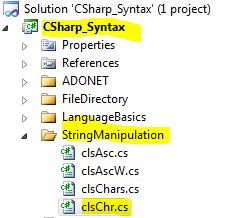
- Add New folder named “StringManipulation”
- Right-click project name in solution explorer;
- add new folder;
- name of folder could be: StringManipulation
- Add Class Named clsChr to StringManipulation folder
- Right-click StringManipulation folder;
- add new item;
- Select class
- Class name could be clsChr
- Click on C# in code in step 1 at top of page to copy code into clsChr.cs
- Click on C# in step 2 at top of page to copy code into Program.cs
- Click green arrow or press F5 to run program