
Column Alias – SQL Server Syntax Example: Column Alias – T-SQL Example

Get 5 Hours of FREE PREMIUM Videos:

LearnVisualStudio.NET Free Preview


LearnVisualStudio.NET Free Preview: Declaring Variables and Assigning Values

I am a lifetime member of LearnVisualStudio.net and a Premium Plus member of dotNetVideos.net.

LearnVisualStudio.net is awesome because it grows in value each year as more videos are added.

dotNetVideos.net is also great because it focuses a lot on MS Certifications and practical interview questions.


- Wade Harvey (IdealProgrammer.com)

LearnVisualStudio Premium Videos

Visual C# 2010 for Absolute Beginners C# for Absolute Beginners C# for Absolute Beginners Study Guide Visual Basic for Absolute Beginners Visual Basic Express Edition Study Guide
Visual Basic 9.0 Language Enhancements Entity Framework Linq To Sql Windows Phone 7 Development Unit Testing
ASP.NET MVC 3 (In Progress) ASP.NET MVC Hands On Project ASP.NET For Absolute Beginners Visual Web Developer C# Study Guide Visual Web Developer VB.NET Study Guide
ASP.NET Controls Series ASP.NET AJAX ASP.NET Architecture Series ASP.NET Server Controls Silverlight 4.0
Windows Presentation Foundation Windows Forms Controls Visual Studio 2010 New Features Visual Studio Team System 2008 Visual Studio Team System Features
Getting Started With Sql Server Express Edition


dotNetVideos Premium Video Catalog

Interview Questions & Answers Windows AzureASP.NET MVC 4Windows Phone 7 (3 Videos)Visual Studio 2011 Application Lifecycle Management
LightSwitchHTML 5SOLIDVisual Studio Add-OnsVisual Studio 2010 ALM Lab Management
ASP.NET 4 Deep Dive Microsoft Enterprise Library 5 with ASP.NET 4 (10 Videos)Virtualization Techniques for Developer (5 Videos)Test Series - 70-519: Designing and Developing Web Applications Using Microsoft .NET Framework 4 (20+ Videos)
Test Series - 70-519: Supplemental70-513: Test Series (MCTS) Windows Communication Foundation 4 (20+ Videos)70-515:Web Applications Development with Microsoft .NET Framework 4 (20+ Videos)Test Series - 70-516: Accessing Data with Microsoft .NET Framework 4 (20+ Videos)Test Series: 70-432: Microsoft SQL Server 2008, Implementation and Maintenance (20+ Videos)
Test Series: 70-433: SQL Server AdministrationFrom Novice To Professional - C# (25 Videos)From Novice To Professional - VB.NET (25 Videos)


Premium (Not Free) Video Tutorials

Free Video Tutorials & Free Tools

Column Alias – SQL Server Syntax Example: Column Alias – T-SQL Example

Purpose: – Illustrates the for the options.

SYNTAX:
SELECT [ ALL | DISTINCT ]
[TOP ( expression ) [PERCENT] [ WITH TIES ] ]
column1 AS displayname1, displayname2 = column_name2, column_name3 displayname3
[ INTO new_table ]
[ FROM { table_source } [ ,...n ] ]
[ WHERE search_condition AND search_condition ]
[ GROUP BY ]
[ HAVING search_condition ]

PURPOSE:
Column Alias allows you to change column headings and also allows
you to group several columns into one.
There are three ways to do this:
1. AS column_name AS new_column_header
2. new_column_header = column_name or expression
3. column_name new_column_header

View Other SQL Server Syntax Examples

 T-SQL |  copy code |? 
-- COLUMN ALIAS example from http://idealprogrammer.com 
-- PURPOSE: Column Alias allows you to change column headings and also allows 
--          you to group several columns into one.
--          There are three ways to do this:
--          1. AS column_name AS new_column_header
--          2. new_column_header = column_name or expression 
--          3. column_name new_column_header
 
 
-- SYNTAX: SELECT [ ALL | DISTINCT ] 
--			[TOP ( expression ) [PERCENT] [ WITH TIES ] ] 
--			< column1 AS displayname1, displayname2 = column_name2, column_name3 displayname3 > 
--			[ INTO new_table ] 
--			[ FROM { table_source } [ ,...n ] ] 
--			[ WHERE search_condition AND search_condition ] 
--			[ GROUP BY ] 
--			[ HAVING  search_condition  ] 
 
 
CREATE TABLE people(
     ID          int,
     firstname   varchar (20),
     lastname    varchar (20),
     statecode   varchar (2),
     alive       bit,
     height      int )
 GO


 INSERT INTO people (ID, firstname, lastname, statecode, alive, height) 
 VALUES (1,  'Paul', 'Revere', 'AL', 0, 72)
 GO
 
 INSERT INTO people (ID, firstname, lastname, statecode, alive, height) 
 VALUES (2,  'John', 'Lennon', 'NY', 0, 69)
 GO
 
 INSERT INTO people (ID, firstname, lastname, statecode, alive, height)
 VALUES (3,  'Steve', 'Martin', 'GA', 1, 75)
 GO
 
 INSERT INTO people (ID, firstname, lastname, statecode, alive, height)
 VALUES (4,  'George', 'Washington', 'MA', 0, 65)
 GO
 
--Show entire table
 SELECT * FROM people;
 GO
 
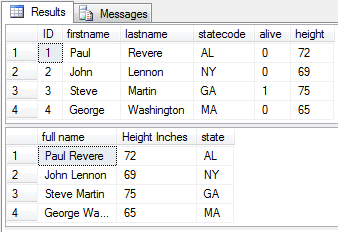
-- Using AS to combine columns and to change column headings 
-- Brackets and single quotes can be used when column heading contains spaces
 SELECT firstname + ' ' + lastname AS [full name], height 'Height Inches',
  state = statecode  
  FROM people; 
 GO
 
 
 drop table people;
 
 GO


Sample Output for Column Alias Example
SQL Server Bitwise

Related posts:

  1. Column AS Alias SQL Server Syntax Example: Column AS T-SQL Example SELECT AS SQL Server Syntax Example: SELECT AS T-SQL Example...
  2. BETWEEN AND – SQL Server Syntax Example: BETWEEN AND – T-SQL Example BETWEEN AND - SQL Server Syntax Example: BETWEEN AND -...
  3. SELECT CASE – SQL Server Syntax Example: SELECT CASE – T-SQL Example SELECT CASE - SQL Server Syntax Example: SELECT CASE -...
  4. SELECT ALL SQL Server Syntax Example: SELECT ALL argument T-SQL Example SELECT ALL SQL Server Example: SELECT ALL argument T-SQL Example...
  5. SELECT AND SQL Server Syntax Example: SELECT AND logical operator T-SQL Example SELECT AND SQL Server Syntax Example: SELECT AND logical operator...

Related posts brought to you by Yet Another Related Posts Plugin.

Comments

2 Responses to “Column Alias – SQL Server Syntax Example: Column Alias – T-SQL Example”

    Trackbacks

    Check out what others are saying about this post...
    1. [...] Column Alias – SQL Server Syntax Example: Column Alias – T-SQL Example | IdealProgrammer… [...]


    Speak Your Mind

    Tell us what you're thinking...
    and oh, if you want a pic to show with your comment, go get a gravatar!

    Powered by WP Hashcash

    This blog uses the cross-linker plugin developed by Web-Developers.Net