
C-Sharp FormatNumber Syntax Example | ASP.NET C# String Method | Source Code
C-Sharp FormatNumber Syntax Example | ASP.NET C# String Method | Source Code
Purpose: – Here is a FormatNumber Example that illustrates the C# Syntax in ASP.NET.
Step 1: Click on C# to Cut-n-paste code into FormatNumber.aspx.cs
using System; using System.Collections.Generic; using System.Linq; using System.Web; using System.Web.UI; using System.Web.UI.WebControls; // This example is from http://idealprogrammer.com // It shows how you can use FormatNumber syntax in C-Sharp ASP.NET //**************************************************************************************** // Syntax: FormatNumber (Expression As Object, _ // NumDigitsAfterDecimal As Integer, _ // IncludeLeadingDigit As TriState, _ // UseParensForNegativeNumbers As TriState, _ // GroupDigits As TriState _ // ) As String // // Returns expression formatted as a number // // Expression - Required - Expression to be formatted // NumDigitsAfterDecimal - Optional - Numeric value indicating how many places are displayed // to the right of the decimal. Default value is –1, which indicates that the computer's // regional settings are used. // IncludeLeadingDigit - Optional. TriState enumeration that indicates whether or not a // leading zero is displayed for fractional values. // UseParensForNegativeNumbers - Optional. TriState enumeration that indicates whether // or not to place negative values within parentheses. // GroupDigits - Optional. TriState enumeration that indicates whether or not numbers are // grouped using the group delimiter specified in the computer's regional settings. //**************************************************************************************** public partial class StringManipulation_FormatNumber : System.Web.UI.Page { protected void Page_Load(object sender, EventArgs e) { Label1.Text = "Example #1: FormatNumber (Expression As Object," + " NumDigitsAfterDecimal As Integer," + " IncludeLeadingDigit As TriState," + " UseParensForNegativeNumbers As TriState," + " GroupDigits As TriState " + " ) As String "; double dblNumber = -5432.43; // Returns "(5,432.430)". Label2.Text = Microsoft.VisualBasic.Strings.FormatNumber(dblNumber, 3, Microsoft.VisualBasic.TriState.UseDefault, Microsoft.VisualBasic.TriState.True, Microsoft.VisualBasic.TriState.True); } } |
Step 2: Click on XML to Cut-n-paste code into FormatNumber.aspx
< %@ Page Language="C#" AutoEventWireup="true" CodeFile="FormatNumber.aspx.cs" Inherits="StringManipulation_FormatNumber" %> < !DOCTYPE html PUBLIC "-//W3C//DTD XHTML 1.0 Transitional//EN" "http://www.w3.org/TR/xhtml1/DTD/xhtml1-transitional.dtd"> <html xmlns="http://www.w3.org/1999/xhtml"> <head runat="server"> <title></title> </head> <body> <form id="form1" runat="server"> <div> <h1><asp:label ID="Label1" runat="server" Text="Label"></asp:label> </h1> <asp:label ID="Label2" runat="server" Text="Label"></asp:label><br /> </div> </form> </body> </html> |
Prerequistes:
- Install Visual Web Developer 2010
- Install SQL Server Express
- Download Northwind and Pubs Databases
- Attach Northwind Database to Databases in Sql Express
- Attach pubs Database to Databases in Sql Express
Notes:
- You can build your own library of syntax examples by using same web site over and over and just add new web forms to it.
Instructions:
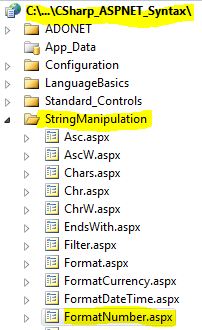
- Use Visual Web Developer 2010
- Create new web site;
- Click File/New Web Site
- Select ASP.NET Website Template
- Select C-Sharp for Language
- name of Web Site could be CSharp_ASPNET_Syntax.
- Add New folder named “StringManipulation”
- Right-click project name in solution explorer;
- add new folder;
- name of folder could be: StringManipulation
- Add Web Form Named FormatNumber.aspx to StringManipulation folder
- Right-click StringManipulation folder;
- add new item;
- Select Web Form
- Check place code behind in separate file
- Web Form name could be FormatNumber.aspx
- Click on C-Sharp in step 1 at the top of this page to copy code into web form FormatNumber.aspx
- Click on XML in step 2 above to copy code into code-behind FormatNumber.aspx.cs
- Right-click on FormatNumber.aspx in solution explorer and select view in browser
