Date Calculation – SQL Server Syntax Example: Date Calculation – T-SQL Example
Date Calculation – SQL Server Syntax Example: Date Calculation – T-SQL Example
Purpose: – Illustrates the SQL Server syntax for the Date Calculation.
SYNTAX:
DATEADD (datepart , number, date ) – Returns a specified date with the specified number interval (signed integer) added to a specified datepart of that date.
* User-defined variables are valid for number and date can be an expression, column expression, user-defined variable, or string literal.
* If the expression is a string literal, it must resolve to a datetime.
* The return data type is the data type of the date argument, except for string literals.
* The return data type for a string literal is datetime. An error will be raised if the string literal seconds scale is more than three positions (.nnn) or contains the time zone offset part.
* Addition for a datepart of microsecond or nanosecond for date data types smalldatetime, date, and datetime is not allowed.
DATEDIFF ( datepart , startdate , enddate ) – Returns the count (signed integer) of the specified datepart boundaries crossed between the specified startdate and enddate.
PURPOSE: DATEADD and DATEDIFF can be used to perform date calculations on date and time datatypes. DATEADD can be used to add to or subtract from a date while DATEDIFF can be used to find the difference between two dates.
Other Excellent Examples of Date Calculations:
- DATEADD – MSDN
- DATEDIFF – MSDN
- SYSTEMDATETIME – MSDN
- Add a value to a Date – java2s
- Examples of How to Calculate Different SQL Server Dates – databasejournal
- SQL Server Date Math – databasejournal
Code Sample for Date Calculation:
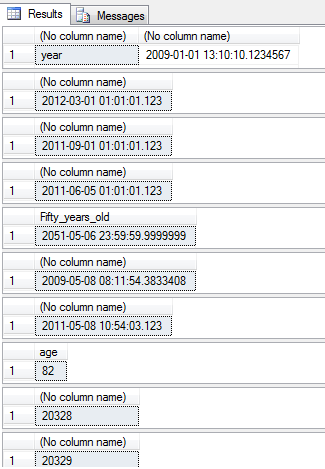
/* Date Calculation example from http://idealprogrammer.com PURPOSE: DATEADD and DATEDIFF can be used to perform date calculations on date and time datatypes. DATEADD can be used to add to or subtract from a date while DATEDIFF can be used to find the difference between two dates. Here is a list of date and time data types: # date # time(n) maximum scale of 7 (.1234567) # datetime maximum scale of 3 (.123) # smalldatetime # datetimeoffset(n) maximum scale of 7 (.1234567) # datetime2 maximum scale of 7 (.1234567) SYNTAX: DATEADD (datepart , number, date ) - - Returns a specified date with the specified number interval (signed integer) added to a specified datepart of that date. * User-defined variables are valid for number and date can be an expression, column expression, user-defined variable, or string literal. * If the expression is a string literal, it must resolve to a datetime. * The return data type is the data type of the date argument, except for string literals. * The return data type for a string literal is datetime. An error will be raised if the string literal seconds scale is more than three positions (.nnn) or contains the time zone offset part. * Addition for a datepart of microsecond or nanosecond for date data types smalldatetime, date, and datetime is not allowed. SYNTAX: DATEDIFF ( datepart , startdate , enddate ) - Returns the count (signed integer) of the specified datepart boundaries crossed between the specified startdate and enddate. NOTES: DATEADD and DATEDIFF can be used in the SELECT list, WHERE, HAVING, GROUP BY and ORDER BY clauses. Here is a list of dateparts: datepart Abbreviations year yy, yyyy quarter qq, q month mm, m dayofyear dy, y day dd, d week wk, ww weekday dw, w hour hh minute mi, n second ss, s millisecond ms Milliseconds have a scale of 3 (.123). microsecond mcs microseconds have a scale of 6 (.123456) nanosecond ns nanoseconds have a scale of 9 (.123456789). */ /******************************************************** DATEADD Examples *********************************************************/ --1. Example of adding to a datepart DECLARE @datetime2 datetime2 = '2008-01-01 13:10:10.1234567' SELECT 'year', DATEADD(year,1,@datetime2) UNION ALL SELECT 'quarter',DATEADD(quarter,2,@datetime2) UNION ALL SELECT 'month',DATEADD(month,3,@datetime2) UNION ALL SELECT 'dayofyear',DATEADD(dayofyear,4,@datetime2) UNION ALL SELECT 'day',DATEADD(day,5,@datetime2) UNION ALL SELECT 'week',DATEADD(week,6,@datetime2) UNION ALL SELECT 'weekday',DATEADD(weekday,7,@datetime2) UNION ALL SELECT 'hour',DATEADD(hour,8,@datetime2) UNION ALL SELECT 'minute',DATEADD(minute,9,@datetime2) UNION ALL SELECT 'second',DATEADD(second,10,@datetime2) UNION ALL SELECT 'millisecond',DATEADD(millisecond,11,@datetime2) UNION ALL SELECT 'microsecond',DATEADD(microsecond,12,@datetime2) UNION ALL SELECT 'nanosecond',DATEADD(nanosecond,13,@datetime2); -- 2. Incrementing datepart so it flows to next level DECLARE @datetime datetime; SET @datetime = '2010-06-01 01:01:01.123'; SELECT DATEADD(quarter,7,@datetime); --2012-03-01 01:01:01.123 SELECT DATEADD(month,15,@datetime); --2011-09-01 01:01:01.123 SELECT DATEADD(dayofyear,369,@datetime); --2011-06-05 01:01:01.123 --3. Using Column or expression for date or number --3.a. Using Column for date CREATE TABLE #DateTable ( dtBirthdate datetime2 ); INSERT INTO #DateTable(dtBirthdate)VALUES('2001-05-06 23:59:59.9999999'); INSERT INTO #DateTable(dtBirthdate)VALUES('1994-06-07 00:00:00.0000000'); INSERT INTO #DateTable(dtBirthdate)VALUES('1954-03-07 23:59:59.9999999'); INSERT INTO #DateTable(dtBirthdate)VALUES('1927-04-08 00:00:00.0000000'); SELECT DATEADD(year,50,dtBirthdate) as Fifty_years_old FROM #DateTable; DROP Table #DateTable; GO --3.b. Using expression for number and system date for date SELECT DATEADD(month,-(6*2), SYSDATETIME()); --3.c. Using constants for date and number SELECT DATEADD(year, 1, '2010-05-08 10:54:03.123'); /******************************************************** DATEDIFF Examples *********************************************************/ --1. Example using column for dates CREATE TABLE #DateTable ( dtBirthdate date ,dtDeathdate date ); INSERT INTO #DateTable(dtBirthdate,dtDeathDate) VALUES('1954-09-11','2036-09-12'); SELECT DATEDIFF(year,dtBirthdate,dtDeathdate) as age FROM #DateTable; DROP Table #DateTable; GO --2. Using user defined variables for dates DECLARE @startdate date = '1954-09-11'; DECLARE @enddate date = '2010-05-08'; SELECT DATEDIFF(day, @startdate, @enddate); --3. Using system function, expression, and constant as date SELECT DATEDIFF(day, '1954-09-11', GETDATE() + 1); /*Other Excellent Examples of Date Calculations: 1. DATEADD - MSDN: http://msdn.microsoft.com/en-us/library/ms186819%28v=SQL.100%29.aspx 2. DATEDIFF - MSDN: http://msdn.microsoft.com/en-us/library/ms189794%28v=SQL.100%29.aspx 3. SYSTEMDATETIME - MSDN: http://msdn.microsoft.com/en-us/library/bb630353(v=SQL.100).aspx 4. Add a value to a Date - java2s: http://www.java2s.com/Code/SQLServer/Select-Query/Addvaluetoadate.htm 5. Examples of How to Calculate Different SQL Server Dates - databasejournal: http://www.databasejournal.com/features/mssql/article.php/3076421/Examples-of-how-to-Calculate-Different-SQL-Server-Dates.htm 6. SQL Server Date Math - databasejournal http://www.databasejournal.com/features/mssql/article.php/10894_2216011_3/Working-with-SQL-Server-DateTime-Variables-Part-Four---Date-Math-and-Universal-Time.htm */ |
Sample Output for Date Calculation Example