EXISTS – SQL Server Syntax Example: EXISTS – T-SQL Example
EXISTS – SQL Server Syntax Example: EXISTS – T-SQL Example
Purpose: – Illustrates the SQL Server syntax for the EXISTS.
SYNTAX:
SELECT [ ALL | DISTINCT ]
[TOP ( expression ) [PERCENT] [ WITH TIES ] ]
[ INTO new_table ]
[ FROM { table_source } [ ,…n ] ]
[ WHERE EXISTS subquery ]
[ GROUP BY ]
[ HAVING search_condition ]
[ ORDER BY order_expression [ ASC | DESC ]
PURPOSE:
EXISTS returns a boolean value that indicates whether a subselect contains any rows.
Code Sample for EXISTS:
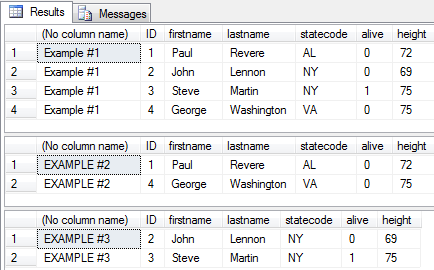
/* EXISTS example from http://idealprogrammer.com PURPOSE: EXISTS returns a boolean value that indicates whether a subselect contains any rows SYNTAX: EXISTS subquery SELECT [ ALL | DISTINCT ] [TOP ( expression ) [PERCENT] [ WITH TIES ] ] column1 AS displayname1, displayname2 = column_name2, column_name3 displayname3 [ INTO new_table ] [ FROM { table_source } [ ,...n ] ] [ WHERE EXISTS subquery ] [ GROUP BY ] [ HAVING search_condition ] [ ORDER BY order_expression [ ASC | DESC ] ] */ CREATE TABLE people( ID int, firstname varchar (20), lastname varchar (20), statecode varchar (2), alive bit, height int ) GO CREATE TABLE addressbook( ID int, firstname varchar (20), lastname varchar (20), email varchar (50)) GO INSERT INTO people (ID, firstname, lastname, statecode, alive, height) VALUES (1, 'Paul', 'Revere', 'AL', 0, 72) GO INSERT INTO people (ID, firstname, lastname, statecode, alive, height) VALUES (2, 'John', 'Lennon', 'NY', 0, 69) GO INSERT INTO people (ID, firstname, lastname, statecode, alive, height) VALUES (3, 'Steve', 'Martin', 'NY', 1, 75) GO INSERT INTO people (ID, firstname, lastname, statecode, alive, height) VALUES (4, 'George', 'Washington', 'VA', 0, 75) GO INSERT INTO addressbook (ID, firstname, lastname, email) VALUES (1, 'Paul', 'Revere', 'paul@email.com') GO INSERT INTO addressbook (ID, firstname, lastname, email) VALUES (2, 'Wade', 'Harvey', 'wade@email.com') GO INSERT INTO addressbook (ID, firstname, lastname, email) VALUES (3, 'Jack', 'Powers', 'jack@email.com') GO INSERT INTO addressbook (ID, firstname, lastname, email) VALUES (4, 'George', 'Washington', 'george@email.com') GO -- 1. Specifying null in subselect to still return result set SELECT 'Example #1', * FROM people WHERE EXISTS (SELECT NULL) GO -- 2. Using EXISTS to find rows that are in subselect SELECT 'EXAMPLE #2', * FROM people p WHERE EXISTS (SELECT * FROM addressbook a WHERE p.firstname = a.firstname) GO -- 3. Using NOT EXISTS to find rows that are NOT in subselect SELECT 'EXAMPLE #3', * FROM people p WHERE NOT EXISTS (SELECT * FROM addressbook a WHERE p.firstname = a.firstname) GO DROP TABLE people; GO DROP TABLE addressbook; GO |
Sample Output for EXISTS Example