GROUP BY – SQL Server Syntax Example: GROUP BY – T-SQL Example
GROUP BY – SQL Server Syntax Example: GROUP BY – T-SQL Example
Purpose: – Illustrates the SQL Server syntax for the GROUP BY.
SYNTAX:
SELECT [ ALL | DISTINCT ]
[TOP ( expression ) [PERCENT] [ WITH TIES ] ]
[ INTO new_table ]
[ FROM { table_source } [ ,…n ] ]
[ WHERE select_condition ]
[ GROUP BY ]
[ HAVING search_condition ]
[ ORDER BY order_expression [ ASC | DESC ]
PURPOSE:
Groups rows by terms specified in group by clause. One row is returned for each group. Any aggregates specified in select clause are aggregates for each group.
Other Excellent Examples for GROUP BY
Code Sample for GROUP BY:
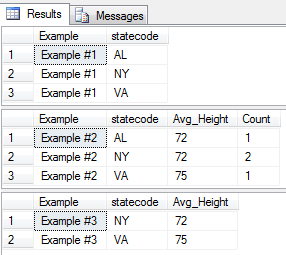
/* GROUP BY example from http://idealprogrammer.com PURPOSE: Groups rows by terms specified in group by clause. One row is returned for each group. Any aggregates specified in select clause are aggregates for each group. NOTES: 1. Terms in the group by clause do not have to be in the select clause, but any non-aggregate terms in the select clause must be in the GROUP BY clause. 2. The HAVING clause is often used with the GROUP BY clause to filter the groups in the result set. 3. GROUP BY does not sort the groups - use ORDER BY to do that 4. If term in GROUP BY contains nulls, a group is created for nulls for that term. SYNTAX: GROUP BY {group by spec} {group by spec} where that is equal to {group by item} [ ,...n ] {group by item} where that is equal to {simple group by item} | {rollup spec} | {cube spec} | {grouping sets spec} | {grand total} {simple group by item} where that is equal to {column_expression} {rollup spec} where that is equal to ROLLUP ( {composite element list} ) (Rollup generates the simple GROUP BY aggregate rows, plus subtotal or super-aggregate rows, and also a grand total row. One row is generated for each unique combination in the group by clause. For example, GROUP BY a,b,c generates a row for each of the following: 1. (a,b,c), 2. (a,b), 3. (a), and 4. a grand total row. The number of rows generated is always equal to the number of terms in GROUP BY clause plus one. ) {cube spec} where that is equal to CUBE ( {composite element list} ) (CUBE generates simple GROUP BY aggregate rows, the ROLLUP super-aggregate rows, and cross-tabulation rows. CUBE generates a row for each permutation of the terms in the GROUP BY clause.) {composite element list} where that is equal to {composite element} [ ,...n ] {composite element} where that is equal to {simple group by item} | ( {simple group by item list} ) {simple group by item list} where that is equal to {simple group by item} [ ,...n ] {grouping sets spec} where that is equal to GROUPING SETS ( {grouping set list} ) {grouping set list} where that is equal to {grouping set} [ ,...n ] {grouping set} where that is equal to {grand total} | {grouping set item} | ( {grouping set item list} ) {empty group} where that is equal to ( ) {grouping set item} where that is equal to {simple group by item} | {rollup spec} | {cube spec} {grouping set item list} where that is equal to {grouping set item} [ ,...n ] SELECT [ ALL | DISTINCT ] [TOP ( expression ) [PERCENT] [ WITH TIES ] ] column1 AS displayname1, displayname2 = column_name2, column_name3 displayname3 [ INTO new_table ] [ FROM { table_source } [ ,...n ] ] [ WHERE search_condition ] [ GROUP BY ] [ HAVING search_condition ] [ ORDER BY order_expression [ ASC | DESC ] ] */ CREATE TABLE people( ID int, firstname varchar (20), lastname varchar (20), statecode varchar (2), alive bit, height int ) GO INSERT INTO people (ID, firstname, lastname, statecode, alive, height) VALUES (1, 'Paul', 'Revere', 'AL', 0, 72) GO INSERT INTO people (ID, firstname, lastname, statecode, alive, height) VALUES (2, 'John', 'Lennon', 'NY', 0, 69) GO INSERT INTO people (ID, firstname, lastname, statecode, alive, height) VALUES (3, 'Steve', 'Martin', 'NY', 1, 75) GO INSERT INTO people (ID, firstname, lastname, statecode, alive, height) VALUES (4, 'George', 'Washington', 'VA', 0, 75) GO -- 1. Simple GROUP BY SELECT 'Example #1' as Example, statecode FROM people GROUP BY statecode GO -- 2. GROUP BY with aggregates SELECT 'Example #2' as Example, statecode, AVG(height) as Avg_Height, COUNT(*) as Count FROM people GROUP BY statecode GO -- 3. GROUP BY with HAVING SELECT 'Example #3' as Example, statecode, AVG(height) as Avg_Height FROM people GROUP BY statecode HAVING statecode <> 'AL' GO DROP TABLE people; GO /* Other Excellent Examples for GROUP BY 1. GROUP BY - msdn http://msdn.microsoft.com/en-us/library/ms177673%28v=SQL.100%29.aspx 2. GROUP BY - java2s http://www.java2s.com/Code/SQLServer/Select-Query/Group-BY.htm */ |
Sample Output for GROUP BY Example