ISNULL – SQL Server Syntax Example: ISNULL – T-SQL Example
ISNULL – SQL Server Syntax Example: ISNULL – T-SQL Example
Purpose: – Illustrates the SQL Server syntax for the ISNULL.
SYNTAX:
SELECT [ ALL | DISTINCT ]
[TOP ( expression ) [PERCENT] [ WITH TIES ] ]
column_list, ISNULL(check_expression, replacement_value)
[ INTO new_table ]
[ FROM { table_source } [ ,…n ] ]
[ WHERE search_condition ]
[ GROUP BY ]
[ HAVING search_condition ]
[ ORDER BY order_expression [ ASC | DESC ]
PURPOSE:
IS NULL returns true or false indicating whether value is NULL.
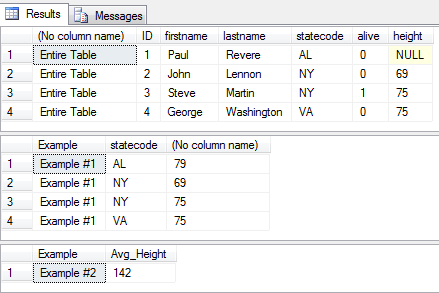
Code Sample for ISNULL:
/* ISNULL example from http://idealprogrammer.com PURPOSE: ISNULL is used in SELECT clause to replace NULL values with a default value. Do not use ISNULL in WHERE clause to find NULL - use IS NULL instead. SYNTAX: ISNULL(check_expression, replacement_value) SELECT [ ALL | DISTINCT ] [TOP ( expression ) [PERCENT] [ WITH TIES ] ] column_list, ISNULL(check_expression, replacement_value) [ INTO new_table ] [ FROM { table_source } [ ,...n ] ] [ WHERE test_expression IS [NOT] NULL ] [ GROUP BY ] [ HAVING search_condition ] [ ORDER BY order_expression [ ASC | DESC ] ] */ CREATE TABLE people( ID int, firstname varchar (20), lastname varchar (20), statecode varchar (2), alive bit, height int ) GO INSERT INTO people (ID, firstname, lastname, statecode, alive) -- height is NULL VALUES (1, 'Paul', 'Revere', 'AL', 0) GO INSERT INTO people (ID, firstname, lastname, statecode, alive, height) VALUES (2, 'John', 'Lennon', 'NY', 0, 69) GO INSERT INTO people (ID, firstname, lastname, statecode, alive, height) VALUES (3, 'Steve', 'Martin', 'NY', 1, 75) GO INSERT INTO people (ID, firstname, lastname, statecode, alive, height) VALUES (4, 'George', 'Washington', 'VA', 0, 75) GO -- Select entire table SELECT 'Entire Table', * FROM people -- 1. Using ISNULL to replace column values when null SELECT 'Example #1' as Example, statecode, ISNULL(height,79) FROM people GO -- 2. Using ISNULL with AVG to replace all NULL heights with 350 SELECT 'Example #2' as Example, AVG(ISNULL(height,350)) As Avg_Height FROM people GO DROP TABLE people; GO |
Sample Output for ISNULL Example