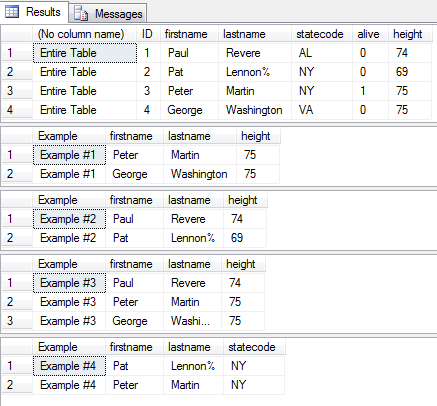
Logical Operators – SQL Server Syntax Example: Logical Operators – T-SQL Example
Logical Operators – SQL Server Syntax Example: Logical Operators – T-SQL Example
Purpose: – Illustrates the SQL Server syntax for the logical operators.
SYNTAX:
SELECT [ ALL | DISTINCT ]
[TOP ( expression ) [PERCENT] [ WITH TIES ] ]
[ INTO new_table ]
[ FROM { table_source } [ ,…n ] ]
[ WHERE expression1 logical_operator expression2 ]
[ GROUP BY ]
[ HAVING search_condition ]
[ ORDER BY order_expression [ ASC | DESC ]
PURPOSE:
Logical operators return true or false indicating indicating whether condition is true.
LOGICAL OPERATORS:
| Operator | Meaning |
| ALL | TRUE if all of a set of comparisons are TRUE. |
| AND | TRUE if both Boolean expressions are TRUE. |
| ANY | TRUE if any one of a set of comparisons are TRUE. |
| BETWEEN | TRUE if the operand is within a range including bounds. |
| EXISTS | TRUE if a subquery contains any rows. |
| IN | TRUE if the operand is equal to one of a list of expressions. |
| LIKE | TRUE if the operand matches a pattern. |
| NOT | Reverses the value of any other Boolean operator. |
| OR | TRUE if either Boolean expression is TRUE. |
| SOME | TRUE if some of a set of comparisons are TRUE. |
Code Sample for Logical Operators:
/* Logical Operators example from http://idealprogrammer.com PURPOSE: Logical operators return true or false indicating whether a condition is true. Here are the various types of operators (including logical): arithmetic, assignment, bitwise, comparison, logical, scope resolution, string concatenation, and unary. SYNTAX: LOGICAL OPERATORS: Operator Meaning ALL TRUE if all of a set of comparisons are TRUE. AND TRUE if both Boolean expressions are TRUE. ANY TRUE if any one of a set of comparisons are TRUE. BETWEEN TRUE if the operand is within a range including bounds. EXISTS TRUE if a subquery contains any rows. IN TRUE if the operand is equal to one of a list of expressions. LIKE TRUE if the operand matches a pattern. NOT Reverses the value of any other Boolean operator. OR TRUE if either Boolean expression is TRUE. SOME TRUE if some of a set of comparisons are TRUE. SELECT [ ALL | DISTINCT ] [TOP ( expression ) [PERCENT] [ WITH TIES ] ] column_list, ISNULL(check_expression, replacement_value) [ INTO new_table ] [ FROM { table_source } [ ,...n ] ] [ WHERE expression1 logical_operator expression2] [ GROUP BY ] [ HAVING search_condition ] [ ORDER BY order_expression [ ASC | DESC ] ] */ CREATE TABLE people( ID int, firstname varchar (20), lastname varchar (20), statecode varchar (2), alive bit, height int ) GO INSERT INTO people (ID, firstname, lastname, statecode, alive, height) VALUES (1, 'Paul', 'Revere', 'AL', 0, 74) GO INSERT INTO people (ID, firstname, lastname, statecode, alive, height) VALUES (2, 'Pat', 'Lennon%', 'NY', 0, 69) GO INSERT INTO people (ID, firstname, lastname, statecode, alive, height) VALUES (3, 'Peter', 'Martin', 'NY', 1, 75) GO INSERT INTO people (ID, firstname, lastname, statecode, alive, height) VALUES (4, 'George', 'Washington', 'VA', 0, 75) GO -- Select entire table SELECT 'Entire Table', * FROM people -- 1. ALL requires that all rows in subquery be true - returns -- all rows where height is maximum SELECT 'Example #1' as Example, firstname, lastname, height FROM people p WHERE p.height >= ALL (SELECT p2.height FROM people p2) GO -- 2. ANY requires any row in subquery to be true - returns all rows -- that are not maximum SELECT 'Example #2' as Example, firstname, lastname, height FROM people p WHERE p.height < ANY (SELECT p2.height FROM people p2) GO -- 3. BETWEEN returns all rows that are within range including bounds SELECT 'Example #3' as Example, firstname, lastname, height FROM people p WHERE p.height BETWEEN 74 and 75 GO -- 4. LIKE - Using [] to select firstname that starts with P[ae]t% SELECT 'Example #4' as Example, firstname, lastname, statecode FROM people WHERE firstname LIKE 'P[ae]t%' GO DROP TABLE people; GO |
Sample Output for Logical Operators Example