
onreset JavaScript (JS) Example: HTML DOM Objects – Event – onreset JavaScript (JS) Example
onreset JavaScript (JS) Example: HTML DOM Objects – Event – onreset JavaScript (JS) Example
Purpose: – Illustrates the JavaScript syntax for the onreset Event.
Prerequistes:
- Install Visual Web Developer 2008
Syntax: Object.onreset=”yourjavascriptcode()” – Allows you to know when reset button is pressed.
Restrictions: None
Notes:
- You can build your own library of syntax examples by using same web site over and over and just add new files to it.
Instructions:
- Use Visual Web Developer 2008
- Create new web site;
- Click File/New Web Site
- Select ASP.NET Website Template
- Select C-Sharp for language
- name of Web Site could be JavaScript_Syntax.
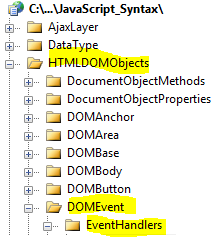
- Add New folder named “HTMLDOMObjects”
- Right-click project name in solution explorer;
- add new folder;
- name of folder should be: HTMLDOMObjects
- Add New subfolder to “HTMLDOMObjects” folder named “DOMEvent”
- Right-click folder named “HTMLDOMObjects” in solution explorer;
- add new folder;
- name of folder should be: DOMEvent
- Add New subfolder to “DOMEvent” subfolder named “EventHandlers”
- Right-click subfolder named “DOMEvent” in solution explorer;
- add new folder;
- name of folder should be: EventHandlers
- Add HTML Page Named onreset to EventHandlers subfolder
- Right-click EventHandlers subfolder;
- add new item;
- Select HTML Page
- HTML Page name should be onreset
- Click on copy code in code below to copy code into HTML Page onreset.htm
- Right-click on HTML page onreset.htm and select view in browser
< !DOCTYPE html PUBLIC "-//W3C//DTD XHTML 1.0 Transitional//EN" "http://www.w3.org/TR/xhtml1/DTD/xhtml1-transitional.dtd">
<html xmlns="http://www.w3.org/1999/xhtml">
<head>
<title>IdealProgrammer.com: onreset </title>
<meta name="description" content="onreset JavaScript (JS) Example: HTML DOM Objects - Event - onreset JavaScript (JS) Example" />
<meta name="keywords" content="example,javascript,js,onreset,code samples" />
<!--
***************************************************
* This example is from http://idealprogrammer.com *
***************************************************
*****************************************************
DOM Objects
*****************************************************
*****************************************************
*** DOM Event - EventHandlers ***
*****************************************************
*****************************************************
*** onreset
*****************************************************
SYNTAX:
object.onreset="yourjavascriptcode()" Allows you to know when reset button
is pressed.
=================================================================
An EXCELLENT tutorial on event basics can be found at:
http://www.quirksmode.org/js/introevents.html
=================================================================
You can access the following properties thru the event handler:
Available Properties
altKey Retrieves a value that indicates the state of the ALT key.
altLeft Retrieves a value that indicates the state of the left ALT key.
clientX Sets or retrieves the x-coordinate of the mouse pointer's position relative to the client area of the window, excluding window decorations and scroll bars.
clientY Sets or retrieves the y-coordinate of the mouse pointer's position relative to the client area of the window, excluding window decorations and scroll bars.
ctrlLeft Sets or retrieves the state of the left CTRL key.
offsetX Sets or retrieves the x-coordinate of the mouse pointer's position relative to the object firing the event.
offsetY Sets or retrieves the y-coordinate of the mouse pointer's position relative to the object firing the event.
returnValue Sets or retrieves the return value from the event.
screenX Sets or retrieves the x-coordinate of the mouse pointer's position relative to the user's screen.
screenY Sets or retrieves the y-coordinate of the mouse pointer's position relative to the user's screen.
shiftLeft Retrieves the state of the left SHIFT key.
srcElement Sets or retrieves the object that fired the event.
type Sets or retrieves the event name from the event object.
x Sets or retrieves the x-coordinate (in pixels) of the mouse pointer's offset from the closest relatively positioned parent element of the element that fired the event.
y Sets or retrieves the y-coordinate (in pixels) of the mouse pointer's offset from the closest relatively positioned parent element of the element that fired the event.
The captureEvents() method captures all the events of the event type passed.
When you have multiple events to capture, separate them with the pipe, |, character.
Here are the types of event you can capture:
Event.ABORT
Event.BLUR
Event.CHANGE
Event.CLICK
Event.DBLCLICK
Event.DRAGDROP
Event.ERROR
Event.FOCUS
Event.KEYDOWN
Event.KEYPRESS
Event.KEYUP
Event.LOAD
Event.MOUSEDOWN
Event.MOUSEMOVE
Event.MOUSEOUT
Event.MOUSEOVER
Event.MOUSEUP
Event.MOVE
Event.RESET
Event.RESIZE
Event.SELECT
Event.SUBMIT
Event.UNLOAD
-->
<script type="text/javascript">
<!--
function displayMsg() {
document.getElementById("msg").innerHTML = "All of the fields have been cleared";
}
function displaySub(form) {
var myText = "Your info has been submitted: <br/><br />";
myText += document.getElementById("firstname").value + "<br />";
myText += document.getElementById("middlename").value + "<br />";
myText += document.getElementById("lastname").value + "<br />";
document.getElementById("msg").innerHTML = myText;
}
-->
</script>
</head>
<body>
<center><a href="http://myqol.com">Progress Monitor has 100s of Code Samples</a></center>
<form name="form1" onreset='displayMsg()' onsubmit ='displaySub();return false;'>
First Name: <input type= "text" id="firstname" size="40"/><br /><br />
Middle Name:<input type= "text" id="middlename" size="40"/><br /><br />
Last Name: <input type= "text" id="lastname" size="40"/><br /><br />
<input type="reset" value="reset" name="Reset" />
<input type="submit" value="submit" name="Submit" />
</form>
<br />
<form name="form2" >
Message:<p id="msg"></p>
</form>
<br /><br />
</body>
</html> |
