SELECT INTO – SQL Server Syntax Example: SELECT INTO – T-SQL Example
SELECT INTO – SQL Server Syntax Example: SELECT INTO – T-SQL Example
Purpose: – Illustrates the SQL Server syntax for SELECT INTO.
SYNTAX:
SELECT [ ALL | DISTINCT ]
[TOP ( expression ) [PERCENT] [ WITH TIES ] ]
column_list
[ INTO new_table ]
[ FROM { table_source } [ ,…n ] ]
[ WHERE select_condition]
[ GROUP BY ]
[ HAVING search_condition ]
[ ORDER BY {order_by_expression [ COLLATE collation_name ] [ ASC | DESC ]} [ ,…n ] ]
PURPOSE:
SELECT INTO creates a new table in the default file group with the columns and rows from the result set of the SELECT. If you want to create a table in a database other than the default file group, fully qualify the table name – database.schema.table_name. The columns are created in the order that they are specified in the select clause.
Code Sample for SELECT INTO:
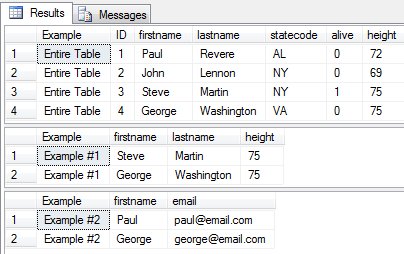
/* SELECT INTO example from http://idealprogrammer.com PURPOSE: SELECT INTO creates a new table in the default file group with the columns and rows from the result set of the SELECT. If you want to create a table in a database other than the default file group, fully qualify the table name - database.schema.table_name. The columns are created in the order that they are specified in the select clause. SYNTAX: [ INTO new_table ] SELECT [ ALL | DISTINCT ] [TOP ( expression ) [PERCENT] [ WITH TIES ] ] column_list [ INTO new_table ] [ FROM { table_source } [ ,...n ] ] [ WHERE select_condition] [ GROUP BY ] [ HAVING search_condition ] [ ORDER BY order_expression [ ASC | DESC ] ] */ CREATE TABLE people( ID INT, firstname VARCHAR (20), lastname VARCHAR (20), statecode VARCHAR (2), alive BIT, height INT ) GO CREATE TABLE addressbook( ID INT, firstname VARCHAR (20), lastname VARCHAR (20), email VARCHAR (50)) GO INSERT INTO people (ID, firstname, lastname, statecode, alive, height) VALUES (1, 'Paul', 'Revere', 'AL', 0, 72) GO INSERT INTO people (ID, firstname, lastname, statecode, alive, height) VALUES (2, 'John', 'Lennon', 'NY', 0, 69) GO INSERT INTO people (ID, firstname, lastname, statecode, alive, height) VALUES (3, 'Steve', 'Martin', 'NY', 1, 75) GO INSERT INTO people (ID, firstname, lastname, statecode, alive, height) VALUES (4, 'George', 'Washington', 'VA', 0, 75) GO INSERT INTO addressbook (ID, firstname, lastname, email) VALUES (1, 'Paul', 'Revere', 'paul@email.com') GO INSERT INTO addressbook (ID, firstname, lastname, email) VALUES (2, 'Wade', 'Harvey', 'wade@email.com') GO INSERT INTO addressbook (ID, firstname, lastname, email) VALUES (3, 'Jack', 'Powers', 'jack@email.com') GO INSERT INTO addressbook (ID, firstname, lastname, email) VALUES (4, 'George', 'Washington', 'george@email.com') GO --Display entire table Select 'Entire Table' As Example,* from people -- 1. Example of single table to create table SELECT 'Example #1' as Example, firstname, lastname, height INTO Tall_People FROM people p WHERE height > 72 SELECT * FROM Tall_People; DROP TABLE Tall_People; GO -- 2. Example of multiple tables to create single table SELECT 'Example #2' as Example, p.firstname, p.lastname, a.email INTO people_address FROM people p INNER JOIN addressbook a ON p.firstname = a.firstname AND p.lastname = a.lastname SELECT Example, firstname, email FROM people_address; DROP TABLE people_address; GO DROP TABLE people; GO DROP TABLE addressbook; GO |
Sample Output for SELECT INTO Example