SELECT – SQL Server Syntax Example: SELECT – T-SQL Example
SELECT – SQL Server Syntax Example: SELECT – T-SQL Example
Purpose: – Illustrates the SQL Server syntax for SELECT Statement.
SYNTAX:
SELECT [ ALL | DISTINCT ]
[TOP ( expression ) [PERCENT] [ WITH TIES ] ]
column_list
[ INTO new_table ]
[ FROM { table_source } [ ,…n ] ]
[ WHERE select_condition]
[ GROUP BY ]
[ HAVING search_condition ]
[ ORDER BY order_expression [ ASC | DESC ]
NOTES: The order of the clauses in the SELECT statement is important. Any one of the optional
clauses can be omitted, but when the optional clauses are used, they must be in the
appropriate order.
Here is the processing order for a SELECT statement.
1. FROM
2. ON
3. JOIN
4. WHERE
5. GROUP BY
6. WITH CUBE or WITH ROLLUP
7. HAVING
8. SELECT
9. DISTINCT
10. ORDER BY
11. TO
PURPOSE:
SELECT Retrieves rows from one or more tables. Relational algebra is used to filter the number of rows and columns returned. The number of rows returned can be filtered through the relational algebra concept known as “restriction.” The number of columns returned can be limited by using a relational algebra concept known as projection. Restriction returns a slice of all rows from a horizontal perspective while projection returns a slice of all possible columns from a vertical perspective.
The UNION, EXCEPT and INTERSECT operators can be used between queries to combine or compare their results into one result set.
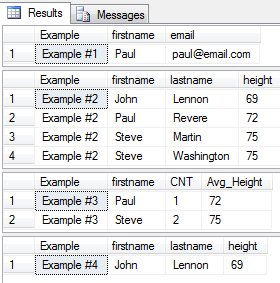
Code Sample for SELECT:
/* SELECT example from http://idealprogrammer.com PURPOSE: Retrieves rows from one or more tables. Relational algebra is used to filter the number of rows and columns returned. The number of rows returned can be filtered through the relational algebra concept known as "restriction." The number of columns returned can be limited by using a relational algebra concept known as projection. Restriction returns a slice of all rows from a horizontal perspective while projection returns a slice of all possible columns from a vertical perspective. The UNION, EXCEPT and INTERSECT operators can be used between queries to combine or compare their results into one result set. SYNTAX: SELECT [ ALL | DISTINCT ] [TOP ( expression ) [PERCENT] [ WITH TIES ] ] column_list [ INTO new_table ] [ FROM { table_source } [ ,...n ] ] [ WHERE select_condition] [ GROUP BY ] [ HAVING search_condition ] [ ORDER BY order_expression [ ASC | DESC ] ] NOTES: The order of the clauses in the SELECT statement is important. Any one of the optional clauses can be omitted, but when the optional clauses are used, they must be in the appropriate order. Here is the processing order for a SELECT statement. 1. FROM 2. ON 3. JOIN 4. WHERE 5. GROUP BY 6. WITH CUBE or WITH ROLLUP 7. HAVING 8. SELECT 9. DISTINCT 10. ORDER BY 11. TOP */ CREATE TABLE people( ID INT, firstname VARCHAR (20), lastname VARCHAR (20), statecode VARCHAR (2), alive BIT, height INT ) GO CREATE TABLE addressbook( ID INT, firstname VARCHAR (20), lastname VARCHAR (20), email VARCHAR (50)) GO INSERT INTO people (ID, firstname, lastname, statecode, alive, height) VALUES (1, 'Paul', 'Revere', 'AL', 0, 72) GO INSERT INTO people (ID, firstname, lastname, alive, height) -- statecode NULL VALUES (2, 'John', 'Lennon', 0, 69) GO INSERT INTO people (ID, firstname, lastname, statecode, alive, height) VALUES (3, 'Steve', 'Martin', 'NY', 1, 75) GO INSERT INTO people (ID, firstname, lastname, statecode, alive, height) VALUES (4, 'Steve', 'Washington', 'VA', 0, 75) GO INSERT INTO addressbook (ID, firstname, lastname, email) VALUES (1, 'Paul', 'Revere', 'paul@email.com') GO INSERT INTO addressbook (ID, firstname, lastname, email) VALUES (2, 'Wade', 'Harvey', 'wade@email.com') GO INSERT INTO addressbook (ID, firstname, lastname, email) VALUES (3, 'Jack', 'Powers', 'jack@email.com') GO INSERT INTO addressbook (ID, firstname, lastname, email) VALUES (4, 'George', 'Washington', 'george@email.com') GO -- 1. Example of using INTO with multiple tables SELECT 'Example #1' as Example, p.firstname, p.lastname, a.email INTO peopleaddress FROM people p INNER JOIN addressbook a ON p.firstname = a.firstname AND p.lastname = a.lastname SELECT Example, firstname, email FROM peopleaddress; DROP TABLE peopleaddress; GO -- 2. Example of SORTING RESULTS using multiple columns and DESC -- Sort will be height ascending and then by first name descending SELECT 'Example #2' as Example, firstname, lastname, height FROM people p ORDER BY height, firstname DESC GO -- 3. Example of using FUNCTIONS, GROUP BY AND HAVING -- Sort will be by first name SELECT 'Example #3' as Example, firstname, COUNT(*) AS CNT, AVG(height) AS Avg_Height FROM people p GROUP BY firstname HAVING AVG(height) > 70 ORDER BY 2 -- firstname is the second column in select list GO -- 4. Example of using NULL SELECT 'Example #4' as Example, firstname, lastname, height FROM people p WHERE statecode IS NULL GO DROP TABLE people; GO DROP TABLE addressbook; GO |
Sample Output for SELECT Example