
VB.NET Binary File Read Random – Source Code Example
VB.NET Binary File Read Random – Source Code Example
Purpose: – Illustrates the VB.NET Syntax for Random Read of Binary File.
Prerequistes:
- Install Visual Basic (Express or Standard Edition)
- Install SQL Server Express
- Download Northwind and pubs Database
- Attach Northwind Database to Databases in Sql Express
- Attach pubs Database to Databases in Sql Express
Notes:
- Console Application is used to simplify things, but Windows Forms or Web Forms could also be used
- You can build a library of syntax examples by using same project over and over and just commenting out what you do not want to execute in Module1.vb
Instructions:
- Use Visual Basic 2008 Express or Standard Edition
- Create new project;
- Click File/New Project
- Select Console Application Template
- Select Visual Basic for Language
- name of project could be VBNET_Syntax.
- Add New folder named “FileDirectory”
- Right-click project name in solution explorer;
- add new folder;
- name of folder could be: FileDirectory
- Add Class Named clsBinaryFileReadRandom to FileDirectory folder
- Right-click FileDirectory folder;
- add new item;
- Select class
- Class name could be clsBinaryFileReadRandom
- Click on copy code in code below to copy code into clsBinaryFileReadRandom.vb
- Click on copy code in second set of code below to copy code into Module1.vb
- Click green arrow or press F5 to run program
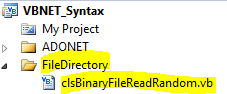
Step 1: Use Copy Code to Cut-n-paste code into clsBinaryFileReadRandom.vb
Imports System.IO Imports System.Collections Imports System.Runtime.Serialization.Formatters.Binary Imports System.Runtime.Serialization Public Class clsBinaryFileReadRandom Public Shared Sub Main() Dim formatter As BinaryFormatter = New BinaryFormatter() Dim output As FileStream Dim fileName As String = "books.dat" Try output = New FileStream(fileName, FileMode.OpenOrCreate, FileAccess.Write) Dim Book As Book = New Book(1, "The Republic", "Plato") formatter.Serialize(output, Book) Book = New Book(2, "Romeo & Juliet", "Shakespeare") formatter.Serialize(output, Book) Book = New Book(3, "The Symposium", "Plato") formatter.Serialize(output, Book) output.Close() Catch fileException As FileNotFoundException Console.WriteLine("File Does Not Exits") Catch serializableException As SerializationException Console.WriteLine("Error Writing to File") Catch formattingException As FormatException Console.WriteLine("Invalid Format") Catch e As IOException Console.WriteLine("Cannot close file") End Try Dim input As FileStream Dim reader As BinaryFormatter = New BinaryFormatter() input = New FileStream(fileName, FileMode.Open, FileAccess.Read) Dim intFileLength As Integer = input.Length While input.Position < intFileLength Try Dim myBook As Book = CType(reader.Deserialize(input), Book) Console.WriteLine(myBook) Catch serializableException As SerializationException Console.WriteLine("Serialization Exception") End Try End While input.Close() Console.WriteLine("No more records in file") Console.ReadLine() End Sub End Class <Serializable()> Public Structure Book Public ID As Integer <vbfixedstring (25)> Public BookName As String </vbfixedstring><vbfixedstring (25)> Public BookAuthor As String Public Sub New(ByVal new_id As Integer, ByVal Book_name As String, _ ByVal Book_author As String) ID = new_id BookName = Book_name BookAuthor = Book_author End Sub Public Overrides Function ToString() As String Return ID & ": " & BookName & " " & BookAuthor End Function End Structure </vbfixedstring> |
Step 2: Use View Plain to Cut-n-paste code into Module1.vb
Module Module1

    Sub Main()
        '***** DataBaseADONET *************

        'Dim mySQLConnectionConnectionString As New clsSQLConnectionConnectionString
        'mySQLConnectionConnectionString.Main()

        'Dim mySQLInsert As New clsSQLInsert
        'mySQLInsert.Main()

        'Dim mySQLParameters As New clsSQLParameters
        'mySQLParameters.Main()

        'Dim mySQLCallStoredProcedure As New clsSQLCallStoredProcedure
        'mySQLCallStoredProcedure.Main()

        'Dim mySQLSelect As New clsSQLSelect
        'mySQLSelect.Main()

        'Dim mySqlCommandDelete As New clsSqlCommandDelete
        'mySqlCommandDelete.Main()

        'Dim mySqlCommandUpdate As New clsSqlCommandUpdate
        'mySqlCommandUpdate.Main()

        'Dim mySqlDataReader As New clsSqlDataReader
        'mySqlDataReader.Main()

        'Dim myStringFormatDateTime As New clsStringFormatDateTime
        'myStringFormatDateTime.Main()

        'Dim myStringBuilder As New clsStringBuilder
        'myStringBuilder.Main()

        'Dim myString As New clsString
        'myString.Main()

        'Dim myDataTableSqlDataReader As New clsDataTableSqlDataReader
        'myDataTableSqlDataReader.Main()

        Dim myBinaryFileReadRandom As New clsBinaryFileReadRandom
        myBinaryFileReadRandom.Main()

        'Dim myBinaryFileReadSequential As New clsBinaryFileReadSequential
        'myBinaryFileReadSequential.Main()


    End Sub

End Module |
