
VB.NET ASP.NET Binary File Random Read Source Code Example
VB.NET ASP.NET Binary File Random Read Source Code Example
Purpose: – Illustrates using Binary File with Random Read in VB.NET ASP.NET.
Prerequistes:
- Install Visual Web Developer 2010
- Install SQL Server Express
- Download Northwind and Pubs Databases
- Attach Northwind Database to Databases in Sql Express
- Attach pubs Database to Databases in Sql Express
Notes:
- You can build your own library of syntax examples by using same web site over and over and just add new web forms to it.
Instructions:
- Use Visual Web Developer 2010
- Create new web site;
- Click File/New Web Site
- Select ASP.NET Website Template
- Select Visual Basic for Language
- name of Web Site could be VBNET_ASPNET_Syntax.
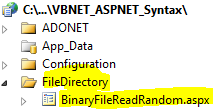
- Add New folder named “FileDirectory”
- Right-click project name in solution explorer;
- add new folder;
- name of folder could be: FileDirectory
- Add Web Form Named BinaryFileRandomRead to FileDirectory folder
- Right-click FileDirectory folder;
- add new item;
- Select Web Form
- Check place code behind in separate file
- Web Form name could be BinaryFileRandomRead
- Click on copy code in code below to copy code into web form BinaryFileRandomRead.aspx
- Click on copy code in second set of code below to copy code into code-behind BinaryFileRandomRead.aspx.vb
- Right-click on BinaryFileRandomRead.aspx in solution explorer and select view in browser
Step 1: Click on Copy Code to Cut-n-paste code into BinaryFileRandomRead.aspx
< %@ Page Language="VB" AutoEventWireup="false" CodeFile="BinaryFileReadRandom.aspx.vb" Inherits="FileDirectory_BinaryFileReadRandom" %> < !DOCTYPE html PUBLIC "-//W3C//DTD XHTML 1.0 Transitional//EN" "http://www.w3.org/TR/xhtml1/DTD/xhtml1-transitional.dtd"> <html xmlns="http://www.w3.org/1999/xhtml"> <head runat="server"> <title></title> </head> <body> <form id="form1" runat="server"> <div> <asp:gridview ID="GridView1" runat="server"> </asp:gridview> </div> </form> </body> </html> |
Step 2: Click on Copy Code to Cut-n-paste code into BinaryFileRandomRead.aspx.vb
Imports System Imports System.IO Imports System.Data ' This example is from http://idealprogrammer.com ' It shows how you can use a binary file to track errors and also trace program execution ' The errors and trace msgs are hard-coded in this example for simplicity Partial Class FileDirectory_BinaryFileReadRandom Inherits System.Web.UI.Page Protected Sub Page_Load(ByVal sender As Object, ByVal e As System.EventArgs) Handles Me.Load Dim myErr As New Err 'Find next available file number Dim file_num As Integer = FreeFile() 'Open file in random mode so we can write the records FileOpen(file_num, "c:\Errors.log", OpenMode.Random, _ OpenAccess.ReadWrite, OpenShare.Shared, _ Len(myErr)) 'Write the records - the errors and trace msgs are hard-coded for simplicity Try FilePut(file_num, New Err(1, "Fake Error: IO error", System.DateTime.Now)) FilePut(file_num, New Err(2, "Fake Error: Array out of Bounds", System.DateTime.Now)) FilePut(file_num, New Err(3, "Fake Error: Divide Exception", System.DateTime.Now)) FilePut(file_num, New Err(4, "Fake Trace Msg: Executed Page Load", System.DateTime.Now)) FilePut(file_num, New Err(5, "Fake Trace Msg: Executed DataBind", System.DateTime.Now)) FilePut(file_num, New Err(6, "Fake Trace Msg: Executed Function to Calc dates", System.DateTime.Now)) Catch fileException As FileNotFoundException FilePut(file_num, New Err(7, "File does not exist", System.DateTime.Now)) Catch formattingException As FormatException FilePut(file_num, New Err(8, "Invalid format", System.DateTime.Now)) End Try Dim Table1 As DataTable Table1 = New DataTable("Errors") 'creating a table named Errors Dim Row1 As DataRow 'declaring row for the table Dim ErrorID As DataColumn = New DataColumn("ErrorID") 'declaring a column named EmployeeID ErrorID.DataType = System.Type.GetType("System.Int32") 'setting the datatype for the column Table1.Columns.Add(ErrorID) 'adding the column to table Dim ErrorDescription As DataColumn = New DataColumn("ErrorDescription") ErrorDescription.DataType = System.Type.GetType("System.String") Table1.Columns.Add(ErrorDescription) Dim ErrorDate As DataColumn = New DataColumn("ErrorDate") ErrorDate.DataType = System.Type.GetType("System.DateTime") Table1.Columns.Add(ErrorDate) 'Read the records Dim myErr2 As ValueType = DirectCast(myErr, ValueType) For i = 6 To 1 Step -2 FileGet(file_num, myErr2, i) myErr = DirectCast(myErr2, Err) Row1 = Table1.NewRow() 'declaring a new row Row1.Item("ErrorID") = myErr.ErrorID 'filling the row with values. Item property is used to set the field value. Row1.Item("ErrorDescription") = myErr.ErrorDescription 'filling the row with values. adding ErrorDescription Row1.Item("ErrorDate") = myErr.ErrorDate 'filling the row with values. Item property is used to set the field value. Table1.Rows.Add(Row1) Next i ' Close the file. Try FileClose(file_num) Catch ex As IOException System.Diagnostics.Debug.Write("Cannot close file") End Try GridView1.DataSource = Table1 GridView1.DataBind() End Sub End Class Public Structure Err Public ErrorID As Integer <vbfixedstring (100)> Public ErrorDescription As String </vbfixedstring><vbfixedstring (50)> Public ErrorDate As String Public Sub New(ByVal new_id As Integer, ByVal error_description As String, _ ByVal error_datetime As String) ErrorID = new_id ErrorDescription = error_description ErrorDate = error_datetime End Sub End Structure </vbfixedstring> |
