
VB.NET ASP.NET Binary File Sequential Read Source Code Example
VB.NET ASP.NET Binary File Sequential Read Source Code Example
Purpose: – Illustrates using Binary File with Sequential Read in VB.NET ASP.NET.
Prerequistes:
- Install Visual Web Developer 2010
- Install SQL Server Express
- Download Northwind and Pubs Databases
- Attach Northwind Database to Databases in Sql Express
- Attach pubs Database to Databases in Sql Express
Notes:
- You can build your own library of syntax examples by using same web site over and over and just add new web forms to it.
Instructions:
- Use Visual Web Developer 2010
- Create new web site;
- Click File/New Web Site
- Select ASP.NET Website Template
- Select Visual Basic for Language
- name of Web Site could be VBNET_ASPNET_Syntax.
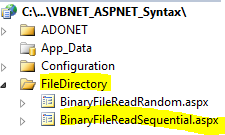
- Add New folder named “FileDirectory”
- Right-click project name in solution explorer;
- add new folder;
- name of folder could be: FileDirectory
- Add Web Form Named BinaryFileReadSequential to FileDirectory folder
- Right-click FileDirectory folder;
- add new item;
- Select Web Form
- Check place code behind in separate file
- Web Form name could be BinaryFileReadSequential
- Click on copy code in code below to copy code into web form BinaryFileReadSequential.aspx
- Click on copy code in second set of code below to copy code into code-behind BinaryFileReadSequential.aspx.vb
- Right-click on BinaryFileReadSequential.aspx in solution explorer and select view in browser
Step 1: Click on Copy Code to Cut-n-paste code into BinaryFileReadSequential.aspx
< %@ Page Language="VB" AutoEventWireup="false" CodeFile="BinaryFileReadSequential.aspx.vb" Inherits="FileDirectory_BinaryFileReadSequential" %> < !DOCTYPE html PUBLIC "-//W3C//DTD XHTML 1.0 Transitional//EN" "http://www.w3.org/TR/xhtml1/DTD/xhtml1-transitional.dtd"> <html xmlns="http://www.w3.org/1999/xhtml"> <head id="Head1" runat="server"> <title></title> </head> <body> <form id="form1" runat="server"> <div> <asp:gridview ID="GridView1" runat="server"> </asp:gridview> </div> </form> </body> </html> |
Step 2: Click on Copy Code to Cut-n-paste code into BinaryFileReadSequential.aspx.vb
Imports System Imports System.IO Imports System.Data Imports System.Runtime.Serialization.Formatters.Binary Imports System.Runtime.Serialization ' This example is from http://idealprogrammer.com ' It shows how you can use a binary file to track errors and also trace program execution ' The errors and trace msgs are hard-coded in this example for simplicity Partial Class FileDirectory_BinaryFileReadSequential Inherits System.Web.UI.Page Protected Sub Page_Load(ByVal sender As Object, ByVal e As System.EventArgs) Handles Me.Load Dim formatter As BinaryFormatter = New BinaryFormatter() Dim output As FileStream Dim fileName As String = "c:\ErrorsSeq.log" Try output = New FileStream(fileName, FileMode.OpenOrCreate, FileAccess.Write) 'Write the records - the errors and trace msgs are hard-coded for simplicity Dim myErr As ErrSeq = New ErrSeq(1, "Fake Error: IO error", System.DateTime.Now) formatter.Serialize(output, myErr) myErr = New ErrSeq(2, "Fake Error: Array out of Bounds", System.DateTime.Now) formatter.Serialize(output, myErr) myErr = New ErrSeq(3, "Fake Error: Divide Exception", System.DateTime.Now) formatter.Serialize(output, myErr) myErr = New ErrSeq(4, "Fake Trace Msg: Executed Page Load", System.DateTime.Now) formatter.Serialize(output, myErr) myErr = New ErrSeq(5, "Fake Trace Msg: Executed DataBind", System.DateTime.Now) formatter.Serialize(output, myErr) myErr = New ErrSeq(6, "Fake Trace Msg: Executed Function to Calc dates", System.DateTime.Now) formatter.Serialize(output, myErr) Catch fileException As FileNotFoundException System.Diagnostics.Debug.Write("File Does Not Exist") Catch serializableException As SerializationException System.Diagnostics.Debug.Write("Error Writing to File") Catch formattingException As FormatException System.Diagnostics.Debug.Write("Invalid Format") Catch ex As IOException System.Diagnostics.Debug.Write("Cannot open file") End Try Try output.Close() Catch ex As IOException System.Diagnostics.Debug.Write("Cannot close file") End Try Dim input As FileStream Dim reader As BinaryFormatter = New BinaryFormatter() input = New FileStream(fileName, FileMode.Open, FileAccess.Read) Dim intFileLength As Integer = input.Length Dim Table1 As DataTable Table1 = New DataTable("Errors") 'creating a table named Errors Dim Row1 As DataRow 'declaring row for the table Dim ErrorID As DataColumn = New DataColumn("ErrorID") 'declaring a column named EmployeeID ErrorID.DataType = System.Type.GetType("System.Int32") 'setting the datatype for the column Table1.Columns.Add(ErrorID) 'adding the column to table Dim ErrorDescription As DataColumn = New DataColumn("ErrorDescription") ErrorDescription.DataType = System.Type.GetType("System.String") Table1.Columns.Add(ErrorDescription) Dim ErrorDate As DataColumn = New DataColumn("ErrorDate") ErrorDate.DataType = System.Type.GetType("System.DateTime") Table1.Columns.Add(ErrorDate) While input.Position < intFileLength Try Dim myErr As ErrSeq = CType(reader.Deserialize(input), ErrSeq) Row1 = Table1.NewRow() 'declaring a new row Row1.Item("ErrorID") = myErr.ErrorID 'filling the row with values. Item property is used to set the field value. Row1.Item("ErrorDescription") = myErr.ErrorDescription 'filling the row with values. adding ErrorDescription Row1.Item("ErrorDate") = myErr.ErrorDate 'filling the row with values. Item property is used to set the field value. Table1.Rows.Add(Row1) Catch serializableException As SerializationException System.Diagnostics.Debug.Write("Serialization Exception") End Try End While input.Close() 'System.Diagnostics.Debug.Write("No more records in file") GridView1.DataSource = Table1 GridView1.DataBind() End Sub End Class <Serializable()> Public Structure ErrSeq Public ErrorID As Integer <vbfixedstring (100)> Public ErrorDescription As String </vbfixedstring><vbfixedstring (50)> Public ErrorDate As String Public Sub New(ByVal new_id As Integer, ByVal error_description As String, _ ByVal error_datetime As String) ErrorID = new_id ErrorDescription = error_description ErrorDate = error_datetime End Sub End Structure </vbfixedstring> |
