*** 4. FormatPercent – Full Example ***
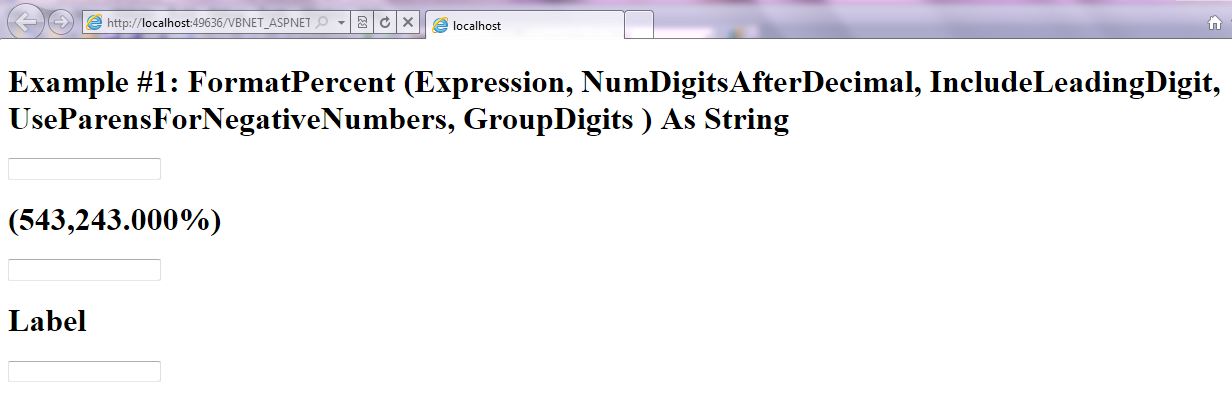
FormatPercent Example Output Screenshot
Step 1: Click on Visual Basic to Cut-n-paste code into FormatPercent.aspx.vb
Imports System
Imports System.IO
Imports System.Data


' This example is from http://idealprogrammer.com
' It shows how you can use FormatPercent syntax in VB.NET ASP.NET
'****************************************************************************************
' Purpose:  Returns an expression formatted as a percentage (that is, multiplied by 100) with
' a trailing % character.
'
' Syntax: 	FormatPercent (Expression As Object, _
' NumDigitsAfterDecimal As Integer, _
' IncludeLeadingDigit As TriState, _
' UseParensForNegativeNumbers As TriState, _
' GroupDigits As TriState _
' ) As String
'
' Parameter1: Expression - Required - Expression to be formatted
'
' Parameter2: NumDigitsAfterDecimal - Optional - Numeric value indicating how
' many places are displayed to the right of the decimal. Default value is –1,
' which indicates that the computer's regional settings are used.
'
' Parameter3: IncludeLeadingDigit - Optional. TriState enumeration that
' indicates whether or not a leading zero is displayed for fractional values.
'
' Parameter4: UseParensForNegativeNumbers - Optional. TriState enumeration
' that indicates whether or not to place negative values within parentheses.
'
' Parameter5: GroupDigits - Optional. TriState enumeration that indicates
' whether or not numbers are grouped using the group delimiter specified
' in the computer's regional settings.
'
' Result: string - Returns string formatted as a number
'
' Quick Example:   Dim dblNumber As Double = -5432.43
' ' Returns "(543,243.000)".
' Label2.Text = FormatPercent(dblNumber, 3, , TriState.True, TriState.True)
'
'
'****************************************************************************************

Partial Class _FormatPercent
    Inherits System.Web.UI.Page

    Protected Sub Page_Load(ByVal sender As Object, ByVal e As System.EventArgs) Handles Me.Load

        Label1.Text = "Example #1: 	FormatPercent (Expression," & _
        " NumDigitsAfterDecimal," & _
        " IncludeLeadingDigit," & _
         " UseParensForNegativeNumbers," & _
        " GroupDigits" & _
         " ) As String "
        Dim dblNumber As Double = -5432.43

        ' Returns "(543,243.000)".
        Label2.Text = Microsoft.VisualBasic.FormatPercent(dblNumber, 3, , TriState.True, TriState.True)

    End Sub
End Class |
Imports System
Imports System.IO
Imports System.Data
' This example is from http://idealprogrammer.com
' It shows how you can use FormatPercent syntax in VB.NET ASP.NET
'****************************************************************************************
' Purpose: Returns an expression formatted as a percentage (that is, multiplied by 100) with
' a trailing % character.
'
' Syntax: FormatPercent (Expression As Object, _
' NumDigitsAfterDecimal As Integer, _
' IncludeLeadingDigit As TriState, _
' UseParensForNegativeNumbers As TriState, _
' GroupDigits As TriState _
' ) As String
'
' Parameter1: Expression - Required - Expression to be formatted
'
' Parameter2: NumDigitsAfterDecimal - Optional - Numeric value indicating how
' many places are displayed to the right of the decimal. Default value is –1,
' which indicates that the computer's regional settings are used.
'
' Parameter3: IncludeLeadingDigit - Optional. TriState enumeration that
' indicates whether or not a leading zero is displayed for fractional values.
'
' Parameter4: UseParensForNegativeNumbers - Optional. TriState enumeration
' that indicates whether or not to place negative values within parentheses.
'
' Parameter5: GroupDigits - Optional. TriState enumeration that indicates
' whether or not numbers are grouped using the group delimiter specified
' in the computer's regional settings.
'
' Result: string - Returns string formatted as a number
'
' Quick Example: Dim dblNumber As Double = -5432.43
' ' Returns "(543,243.000)".
' Label2.Text = FormatPercent(dblNumber, 3, , TriState.True, TriState.True)
'
'
'****************************************************************************************
Partial Class _FormatPercent
Inherits System.Web.UI.Page
Protected Sub Page_Load(ByVal sender As Object, ByVal e As System.EventArgs) Handles Me.Load
Label1.Text = "Example #1: FormatPercent (Expression," & _
" NumDigitsAfterDecimal," & _
" IncludeLeadingDigit," & _
" UseParensForNegativeNumbers," & _
" GroupDigits" & _
" ) As String "
Dim dblNumber As Double = -5432.43
' Returns "(543,243.000)".
Label2.Text = Microsoft.VisualBasic.FormatPercent(dblNumber, 3, , TriState.True, TriState.True)
End Sub
End Class
Step 2: Click on XML to Cut-n-paste code into FormatPercent.aspx
< %@ Page Language="VB" AutoEventWireup="false" CodeFile="FormatPercent.aspx.vb" Inherits="_FormatPercent" %>

< !DOCTYPE html PUBLIC "-//W3C//DTD XHTML 1.0 Transitional//EN" "http://www.w3.org/TR/xhtml1/DTD/xhtml1-transitional.dtd">

<html xmlns="http://www.w3.org/1999/xhtml">
<head runat="server">
    <title></title>
</head>
<body>
    <form id="form1" runat="server">
    <div>
        <h1><asp:label ID="Label1" runat="server" Text="Label"></asp:label> </h1>
         <asp:textbox ID="TextBox1" runat="server"></asp:textbox><br />
          <h1><asp:label ID="Label2" runat="server" Text="Label"></asp:label> </h1>
         <asp:textbox ID="TextBox2" runat="server"></asp:textbox><br />
          <h1><asp:label ID="Label3" runat="server" Text="Label"></asp:label> </h1>
         <asp:textbox ID="TextBox3" runat="server"></asp:textbox><br />


    </div>
    </form>
</body>
</html> |
< %@ Page Language="VB" AutoEventWireup="false" CodeFile="FormatPercent.aspx.vb" Inherits="_FormatPercent" %>
< !DOCTYPE html PUBLIC "-//W3C//DTD XHTML 1.0 Transitional//EN" "http://www.w3.org/TR/xhtml1/DTD/xhtml1-transitional.dtd">
<html xmlns="http://www.w3.org/1999/xhtml">
<head runat="server">
<title></title>
</head>
<body>
<form id="form1" runat="server">
<div>
<h1><asp:label ID="Label1" runat="server" Text="Label"></asp:label> </h1>
<asp:textbox ID="TextBox1" runat="server"></asp:textbox><br />
<h1><asp:label ID="Label2" runat="server" Text="Label"></asp:label> </h1>
<asp:textbox ID="TextBox2" runat="server"></asp:textbox><br />
<h1><asp:label ID="Label3" runat="server" Text="Label"></asp:label> </h1>
<asp:textbox ID="TextBox3" runat="server"></asp:textbox><br />
</div>
</form>
</body>
</html>
Prerequistes:
- Install Visual Web Developer 2010
- Install SQL Server Express
- Download Northwind and Pubs Databases
- Attach Northwind Database to Databases in Sql Express
- Attach pubs Database to Databases in Sql Express
Notes:
- You can build your own library of syntax examples by using same web site over and over and just add new web forms to it.
Instructions:
- Use Visual Web Developer 2010
- Create new web site;
- Click File/New Web Site
- Select ASP.NET Website Template
- Select Visual Basic for Language
- name of Web Site could be VBNET_ASPNET_Syntax.
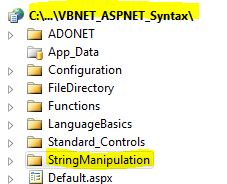
- Add New folder named “StringManipulation”
- Right-click project name in solution explorer;
- add new folder;
- name of folder could be: StringManipulation
- Add Web Form Named FormatPercent to StringManipulation folder
- Right-click StringManipulation folder;
- add new item;
- Select Web Form
- Check place code behind in separate file
- Web Form name could be FormatPercent
- Click on Visual Basic in step 1 at the top of this page to copy code into code-behind FormatPercent.aspx.vb
- Click on XML in step 2 above to copy code into web form FormatPercent.aspx
- Right-click on FormatPercent.aspx in solution explorer and select view in browser
|

 Download Source Code for All VB ASP.NET Examples in One Project – source code for hundreds of VB.NET ASP.NET examples neatly organized in a single project.