VB.NET ASP.NET Mid() Source Code | Mid() Example Syntax
Posted by asp.net videos on Saturday, March 5, 2011 · Leave a Comment
Premium (Not Free) Video Tutorials
Free Video Tutorials & Free Tools
Premium (Not Free) Video Tutorials
Free Video Tutorials & Free Tools
Mid Example Syntax VB.NET ASP.NET | Mid | Source Code
Summary: – Illustrates using Mid with Source Code Syntax Example in VB.NET ASP.NET.
*** 2. Mid Syntax ***
Purpose:
Returns the specified number of characters from the string starting
at the specified position. If the length is not specified, all of the
characters to the end of the string are returned
Syntax:
Mid(string, startIndex[, length])
| Parameters |
Description |
string |
Required – String of which you want to return a portion
|
| startIndex |
Required – Integer (not zero-based) that indicates
starting point
|
| length |
Optional – Integer that indicates number of characters
to return. If the length is not specified, all of the characters to
the end of the string are returned
|
| Result Data Type |
Description |
string |
Returns the specified number of characters from the string starting
at the specified position. If the length is not specified, all of the
characters to the end of the string are returned
|
*** 3. Mid – Quick Example ***
|
Dim strField As String = ” This “
TextBox1.Text = “[” + LTrim(strField) + “]” ‘Returns [This ] with leading spaces removed
|
*** 4. Mid – Full Example ***
Mid Example Output Screenshot
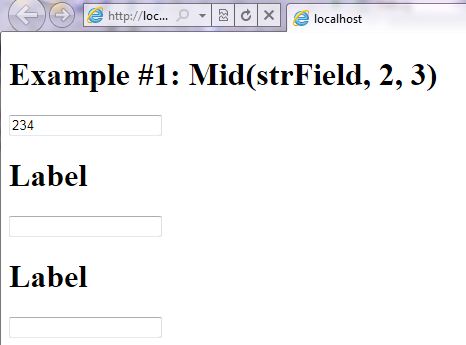
Step 1: Click on Visual Basic to Cut-n-paste code into Mid.aspx.vb
Imports System
Imports System.IO
Imports System.Data

' This example is from http://idealprogrammer.com
' It shows how you can use Mid syntax in VB.NET ASP.NET
'****************************************************************************************
' Purpose:  Returns the specified number of characters from the string starting
' at the specified position. If the length is not specified, all of the
' characters to the end of the string are returned
'
' Syntax: 	Mid(string, startIndex[, length])
'
' Parameter1: string - Required - String of which you want to return a portion
'
' Parameter2: startIndex - Required - Integer (not zero-based) that indicates
' starting point
'
' Parameter3: length - Optional - Integer that indicates number of characters
' to return. If the length is not specified, all of the characters to
' the end of the string are returned
'
' Result: string -  Returns the specified number of characters from the string starting
' at the specified position. If the length is not specified, all of the
' characters to the end of the string are returned
'
' Quick Example:     Dim strField As String = " This "
' TextBox1.Text = "[" + LTrim(strField) + "]" 'Returns [This ] with leading spaces removed
'
'****************************************************************************************

Partial Class _Mid
    Inherits System.Web.UI.Page

    Protected Sub Page_Load(ByVal sender As Object, ByVal e As System.EventArgs) Handles Me.Load

        Label1.Text = "Example #1: Mid(strField, 2, 3) "

        Dim strField As String = "123456"

        TextBox1.Text = Microsoft.VisualBasic.Mid(strField, 2, 3) 'Returns 234


    End Sub
End Class |
Imports System
Imports System.IO
Imports System.Data
' This example is from http://idealprogrammer.com
' It shows how you can use Mid syntax in VB.NET ASP.NET
'****************************************************************************************
' Purpose: Returns the specified number of characters from the string starting
' at the specified position. If the length is not specified, all of the
' characters to the end of the string are returned
'
' Syntax: Mid(string, startIndex[, length])
'
' Parameter1: string - Required - String of which you want to return a portion
'
' Parameter2: startIndex - Required - Integer (not zero-based) that indicates
' starting point
'
' Parameter3: length - Optional - Integer that indicates number of characters
' to return. If the length is not specified, all of the characters to
' the end of the string are returned
'
' Result: string - Returns the specified number of characters from the string starting
' at the specified position. If the length is not specified, all of the
' characters to the end of the string are returned
'
' Quick Example: Dim strField As String = " This "
' TextBox1.Text = "[" + LTrim(strField) + "]" 'Returns [This ] with leading spaces removed
'
'****************************************************************************************
Partial Class _Mid
Inherits System.Web.UI.Page
Protected Sub Page_Load(ByVal sender As Object, ByVal e As System.EventArgs) Handles Me.Load
Label1.Text = "Example #1: Mid(strField, 2, 3) "
Dim strField As String = "123456"
TextBox1.Text = Microsoft.VisualBasic.Mid(strField, 2, 3) 'Returns 234
End Sub
End Class
Step 2: Click on XML to Cut-n-paste code into Mid.aspx
< %@ Page Language="VB" AutoEventWireup="false" CodeFile="Mid.aspx.vb" Inherits="_Mid" %>

< !DOCTYPE html PUBLIC "-//W3C//DTD XHTML 1.0 Transitional//EN" "http://www.w3.org/TR/xhtml1/DTD/xhtml1-transitional.dtd">

<html xmlns="http://www.w3.org/1999/xhtml">
<head runat="server">
    <title></title>
</head>
<body>
    <form id="form1" runat="server">
    <div>
        <h1><asp:label ID="Label1" runat="server" Text="Label"></asp:label> </h1>
         <asp:textbox ID="TextBox1" runat="server"></asp:textbox><br />
          <h1><asp:label ID="Label2" runat="server" Text="Label"></asp:label> </h1>
         <asp:textbox ID="TextBox2" runat="server"></asp:textbox><br />
          <h1><asp:label ID="Label3" runat="server" Text="Label"></asp:label> </h1>
         <asp:textbox ID="TextBox3" runat="server"></asp:textbox><br />


    </div>
    </form>
</body>
</html> |
< %@ Page Language="VB" AutoEventWireup="false" CodeFile="Mid.aspx.vb" Inherits="_Mid" %>
< !DOCTYPE html PUBLIC "-//W3C//DTD XHTML 1.0 Transitional//EN" "http://www.w3.org/TR/xhtml1/DTD/xhtml1-transitional.dtd">
<html xmlns="http://www.w3.org/1999/xhtml">
<head runat="server">
<title></title>
</head>
<body>
<form id="form1" runat="server">
<div>
<h1><asp:label ID="Label1" runat="server" Text="Label"></asp:label> </h1>
<asp:textbox ID="TextBox1" runat="server"></asp:textbox><br />
<h1><asp:label ID="Label2" runat="server" Text="Label"></asp:label> </h1>
<asp:textbox ID="TextBox2" runat="server"></asp:textbox><br />
<h1><asp:label ID="Label3" runat="server" Text="Label"></asp:label> </h1>
<asp:textbox ID="TextBox3" runat="server"></asp:textbox><br />
</div>
</form>
</body>
</html>
Prerequistes:
- Install Visual Web Developer 2010
- Install SQL Server Express
- Download Northwind and Pubs Databases
- Attach Northwind Database to Databases in Sql Express
- Attach pubs Database to Databases in Sql Express
Notes:
- You can build your own library of syntax examples by using same web site over and over and just add new web forms to it.
Instructions:
- Use Visual Web Developer 2010
- Create new web site;
- Click File/New Web Site
- Select ASP.NET Website Template
- Select Visual Basic for Language
- name of Web Site could be VBNET_ASPNET_Syntax.
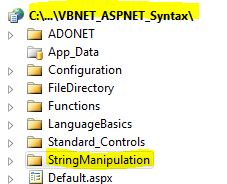
- Add New folder named “StringManipulation”
- Right-click project name in solution explorer;
- add new folder;
- name of folder could be: StringManipulation
- Add Web Form Named Mid to StringManipulation folder
- Right-click StringManipulation folder;
- add new item;
- Select Web Form
- Check place code behind in separate file
- Web Form name could be Mid
- Click on Visual Basic in step 1 at the top of this page to copy code into code-behind Mid.aspx.vb
- Click on XML in step 2 above to copy code into web form Mid.aspx
- Right-click on Mid.aspx in solution explorer and select view in browser
|

 Download Source Code for All VB ASP.NET Examples in One Project – source code for hundreds of VB.NET ASP.NET examples neatly organized in a single project. Check back often to download the latest version of the project with even more code samples.