
Linux Video Tutorial – 1 – The Code Linux One-Hour Historical Documentary

This series of video tutorials will be on Linux. We will start with an excellent one-hour pop culture historical documentary called The Code Linux. The video covers the birth, evolution, and future of Linux. As of Oct 24, 2007, this video has been viewed 129,173 times on Google alone. Don’t miss the song at the end that goes with the credits – it is absolutely awesome…
Quick Overview
Unix operating system was created in the 1960s and became widely available in the 1970s.
One Linux-type system created in 1984 was GNU. The goal of GNU was to create an operating system made out of software that was totally free.
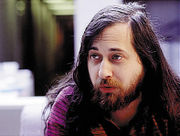 In 1985, Richard Stallman started the Free Software Foundation and created the GNU General Public License (GNU GPL), in order to spread software freely. This is what made the open distribution of Linux possible. (See picture of Stallman to the right of this paragraph.)
 In 1991, Linus Torvalds started to work on a non-commercial replacement for MINIX while he was attending the University of Helsinki. This eventually became the Linux kernel. Linux was originally dependent upon Minux, but Torvalds shifted it to GNU GPL. That opened the door for Linux to become freely distributable. (See the picture of Torvalds to the right of this paragraph.)
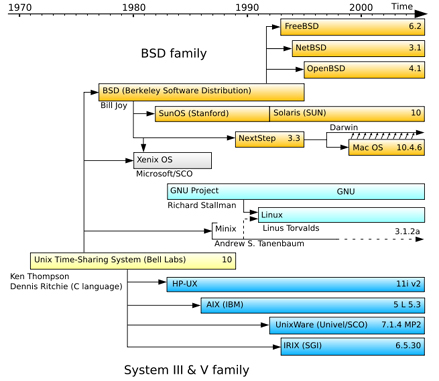
Chart of the History of Unix
The Code Linux
Feb 23, 2006
Sweden
58 minutes
Other Tutorials in This Series
This is a work in progress – More to episodes will be coming…Please bookmark this post and check back often.
To access a catalog of over 700 video tutorials on programming, please click this link: Summary of 700 Programming Tutorials.
