
JavaScript (JS) rev Example: HTML DOM Objects – Anchor Object – JavaScript (JS) rev Example
JavaScript (JS) rev Example: HTML DOM Objects – Anchor Object – JavaScript (JS) rev Example
Purpose: – Illustrates the JavaScript syntax for the Anchor Object rev Property .
Prerequistes:
- Install Visual Web Developer 2008
Syntax: object.rev=relationship – Allows you to retrieve or assign rev for linked objects. rev describes the relationship of the linked object to the current object. rel describes the relationship of the current object to the target, and rev (reverse) describes the relationship of the target object to the target.
Restrictions: None
Notes:
- You can build your own library of syntax examples by using same web site over and over and just add new files to it.
Instructions:
- Use Visual Web Developer 2008
- Create new web site;
- Click File/New Web Site
- Select ASP.NET Website Template
- Select C-Sharp for hrefuage
- name of Web Site could be JavaScript_Syntax.
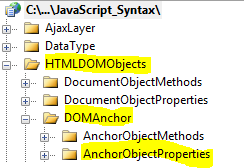
- Add New folder named “HTMLDOMObjects”
- Right-click project name in solution explorer;
- add new folder;
- name of folder should be: HTMLDOMObjects
- Add New subfolder to “HTMLDOMObjects” folder named “DOMAnchor”
- Right-click folder named “HTMLDOMObjects” in solution explorer;
- add new folder;
- name of folder should be: DOMAnchor
- Add New subfolder to “DOMAnchor” subfolder named “AnchorObjectProperties”
- Right-click subfolder named “DOMAnchor” in solution explorer;
- add new folder;
- name of folder should be: AnchorObjectProperties
- Add HTML Page Named rev to AnchorObjectProperties subfolder
- Right-click AnchorObjectProperties subfolder;
- add new item;
- Select HTML Page
- HTML Page name should be rev
- Click on copy code in code below to copy code into HTML Page rev.htm
- Right-click on HTML page rev.htm and select view in browser
< !DOCTYPE html PUBLIC "-//W3C//DTD XHTML 1.0 Transitional//EN" "http://www.w3.org/TR/xhtml1/DTD/xhtml1-transitional.dtd">

<html>
  <head>
    <title>IdealProgrammer.com: rev </title>
    <!--
    ***************************************************
    * This example is from http://idealprogrammer.com *
    ***************************************************
    Here is a table of values that rev can have:

    Value  	Description
appendix 	Link to the appendix page of a document
alternate 	Link to an alternative source
bookmark 	Link to a bookmark. Often used for "permalink" in web blogs
chapter 	Link to a chapter from the current documents
contents 	Link to the table of contents in the current document
copyright 	Link to copyright or policy page of the current document
glossary 	Link to glossary page of the document
index 	Link to the index page of the current document
next 	Link to next page from the current document
prev 	Link to the previous page from the current document
section 	Link to a section in a list of documents
start 	Link to the first page of the current documents. Used by search engines to show the first page
subsection 	Link to a sub-section in a list of current documents.

    -->


   </head>
  <body>
      <a href="http://www.google.com" id="idGoogle" rev="appendix">Google</a><br /><br />
      <a href="http://www.yahoo.com" id="idYahoo" rev="bookmark">Yahoo</a><br /><br />
      <a href="http://idealprogrammer.com" id="idIdealProgrammer" rev="contents">IdealProgrammer</a><br /><br />
      <a href="http://myqol.com" id="idProgressMonitor" rev="index">ProgressMonitor</a><br /><br />

   <script type="text/javascript">
       //*****************************************************
       // DOM Objects
       //*****************************************************


       //*****************************************************
       //    ***    Anchor Object Properties   ***
       //*****************************************************

       //*****************************************************
       // rev
       //*****************************************************

       //    SYNTAX:
       //    object.rev=name  Allows you to retrieve or assign
       //               a rev to an object. rev describes the relationship of
       //               the linked object to the current object
       //    rel describes the relationship of the current object to the target
       //    rev (reverse) describes the relationship of the target object to the
       //    target

       // Two ways to retrieve rev
       //   1. GetElementsByTagName
            myObject=document.getElementsByTagName('a')[0];
            document.write("Google - Using getElementsByTagName : " + myObject.rev);
            document.write("<br />");
      //   2. GetElementById
            document.write("Yahoo - Using getElementById: ");
            document.write(document.getElementById('idYahoo').rev);

            document.write("<br /><br />");
       // Two ways to assign rev

            //   1. GetElementById
            myThirdElement = document.getElementById('idIdealProgrammer');
            myThirdElement.rev = "chapter";
            document.write("<br />IdealProgrammer rev changed to chapter: ", myThirdElement.rev);

       //   2. GetElementsByTagName
            myFourthElement = document.getElementsByTagName('a')[3];
            myFourthElement.rev = "glossary";
            document.write("<br />ProgressMonitor rev changed to glossary: ", myFourthElement.rev)

</script>

  </body>
</html> |
