
charset Example JavaScript (JS): HTML DOM Objects – Anchor Object: charset Example JavaScript (JS)
charset Example JavaScript (JS): HTML DOM Objects – Anchor Object: charset Example JavaScript (JS)
Purpose: – Illustrates the JavaScript syntax for the Anchor Object charset Property .
Prerequistes:
- Install Visual Web Developer 2008
Syntax: object.charset=charset – Allows you to retrieve or assign charset for an element.
Restrictions: Does not work in FireFox
Notes:
- You can build your own library of syntax examples by using same web site over and over and just add new files to it.
Instructions:
- Use Visual Web Developer 2008
- Create new web site;
- Click File/New Web Site
- Select ASP.NET Website Template
- Select C-Sharp for charsetuage
- name of Web Site could be JavaScript_Syntax.
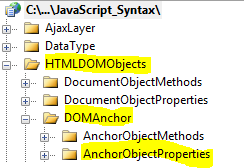
- Add New folder named “HTMLDOMObjects”
- Right-click project name in solution explorer;
- add new folder;
- name of folder should be: HTMLDOMObjects
- Add New subfolder to “HTMLDOMObjects” folder named “DOMAnchor”
- Right-click folder named “HTMLDOMObjects” in solution explorer;
- add new folder;
- name of folder should be: DOMAnchor
- Add New subfolder to “DOMAnchor” subfolder named “AnchorObjectProperties”
- Right-click subfolder named “DOMAnchor” in solution explorer;
- add new folder;
- name of folder should be: AnchorObjectProperties
- Add HTML Page Named charset to AnchorObjectProperties subfolder
- Right-click AnchorObjectProperties subfolder;
- add new item;
- Select HTML Page
- HTML Page name should be charset
- Click on copy code in code below to copy code into HTML Page charset.htm
- Right-click on HTML page charset.htm and select view in browser
< !DOCTYPE html PUBLIC "-//W3C//DTD XHTML 1.0 Transitional//EN" "http://www.w3.org/TR/xhtml1/DTD/xhtml1-transitional.dtd">

<html>
  <head>
    <title>IdealProgrammer.com: charset </title>
    <!--
    ***************************************************
    * This example is from http://idealprogrammer.com *
    ***************************************************
    The following table defines the list of possible values for the character set codes.


Code Value (Codepage) Alphabet
DIN_66003 20106 IA5 (German)
NS_4551-1 20108 IA5 (Norwegian)
SEN_850200_B 20107 IA5 (Swedish)
_autodetect 50932 Japanese (Auto Select)
_autodetect_kr 50949 Korean (Auto Select)
big5 950 Chinese Traditional (Big5)
csISO2022JP 50221 Japanese (JIS-Allow 1 byte Kana)
euc-kr 51949 Korean (EUC)
gb2312 936 Chinese Simplified (GB2312)
hz-gb-2312 52936 Chinese Simplified (HZ)
ibm852 852 Central European (DOS)
ibm866 866 Cyrillic Alphabet (DOS)
irv 20105 IA5 (IRV)
iso-2022-jp 50220 Japanese (JIS)
iso-2022-jp 50222 Japanese (JIS-Allow 1 byte Kana)
iso-2022-kr 50225 Korean (ISO)
iso-8859-1 1252 Western Alphabet
iso-8859-1 28591 Western Alphabet (ISO)
iso-8859-2 28592 Central European Alphabet (ISO)
iso-8859-3 28593 Latin 3 Alphabet (ISO)
iso-8859-4 28594 Baltic Alphabet (ISO)
iso-8859-5 28595 Cyrillic Alphabet (ISO)
iso-8859-6 28596 Arabic Alphabet (ISO)
iso-8859-7 28597 Greek Alphabet (ISO)
iso-8859-8 28598 Hebrew Alphabet (ISO)
koi8-r 20866 Cyrillic Alphabet (KOI8-R)
ks_c_5601 949 Korean
shift-jis 932 Japanese (Shift-JIS)
unicode 1200 Universal Alphabet
unicodeFEFF 1201 Universal Alphabet (Big-Endian)
utf-7 65000 Universal Alphabet (UTF-7)
utf-8 65001 Universal Alphabet (UTF-8)
windows-1250 1250 Central European Alphabet (Windows)
windows-1251 1251 Cyrillic Alphabet (Windows)
windows-1252 1252 Western Alphabet (Windows)
windows-1253 1253 Greek Alphabet (Windows)
windows-1254 1254 Turkish Alphabet
windows-1255 1255 Hebrew Alphabet (Windows)
windows-1256 1256 Arabic Alphabet (Windows)
windows-1257 1257 Baltic Alphabet (Windows)
windows-1258 1258 Vietnamese Alphabet (Windows)
windows-874 874 Thai (Windows)
x-euc 51932 Japanese (EUC)
x-user-defined 50000 User Defined

    -->


   </head>
  <body>
      <input id="Button1" type="button" charset="windows-1253" value="Button1" /><br /><br />
      <input id="Button2" type="button" charset="iso-8859-1" value="Button2" /><br /><br />
      <input id="Button3" type="button" charset="gb2312" value="Button3" /><br /><br />
   <script type="text/javascript">
       //*****************************************************
       // DOM Objects
       //*****************************************************


       //*****************************************************
       //    ***    Anchor Object Properties   ***
       //*****************************************************

       //*****************************************************
       // charset
       //*****************************************************

       //    SYNTAX:
       //    object.charset=charset  Allows you to retrieve or assign
       //               charset to an element

       // Two ways to retrieve charset
       //   1. GetElementsByTagName
            myObject=document.getElementsByTagName('input')[0];
            document.write("Button1 - Using getElementsByTagName : " + myObject.charset);
            document.write("<br />");
      //   2. GetElementById
            document.write("Button1 - Using getElementById: ");
            document.write(document.getElementById('Button1').charset);

            document.write("<br /><br />");
       // Two ways to assign charset

            //   1. GetElementById
            mySecondButton = document.getElementById('Button2');
            mySecondButton.charset = "utf-7";
            document.write("<br />Button2 charset changed to utf-7: ", mySecondButton.charset);

       //   2. GetElementsByTagName
            myThirdButton = document.getElementsByTagName('input')[2];
            myThirdButton.charset = "windows-874";
            document.write("<br />Button3 charset changed to windows-874: ", myThirdButton.charset)

</script>

  </body>
</html> |
